Swagger前世今生
大后端时代:前端只用管理静态页面,后端写jsp等等
前后端分离时代:前端写前端控制层,视图层 可以伪造json数据进行测试 例如postman
后端控制层,服务层,数据访问层
现在前后端甚至可以部署在不同的服务器上
这样就产生了一个问题
Swagger
- 号称是世界上最流行的api框架
- Restful Api文档在线生成工具=》api文档和api定义开发
- 直接运行,可以在线测试api接口
- 多种语言
Springboot集成swagger
1、导入依赖(springboot2.x版本 因为引入swagger要springfox 现在的springfox还并未支持spirngboot3)
<dependency>
<groupId>
io.springfox
</groupId>
<artifactId>
springfox-swagger2
</artifactId>
<version>
3.0.0
</version>
</dependency>
<dependency>
<groupId>
io.springfox
</groupId>
<artifactId>
springfox-swagger-ui
</artifactId>
<version>
3.0.0
</version>
</dependency>
|
新版本(3.0)直接有starter
<dependency>
    <groupId>
        io.springfox
    </groupId>
    <artifactId>
        springfox-boot-starter
    </artifactId>
    <version>
        3.0.0
    </version>
</dependency>
|
针对springboot3和jdk17的依赖引入 使用替代openapi
<dependency>
<groupId>
org.springdoc
</groupId>
<artifactId>
springdoc-openapi-starter-webmvc-ui
</artifactId>
<version>
2.2.0
</version>
</dependency>
<dependency>
<groupId>
org.springframework.boot
</groupId>
<artifactId>
spring-boot-starter-web
</artifactId>
</dependency>
<dependency>
<groupId>
org.projectlombok
</groupId>
<artifactId>
lombok
</artifactId>
<optional>
true
</optional>
</dependency>
<dependency>
<groupId>
org.springframework.boot
</groupId>
<artifactId>
spring-boot-starter-test
</artifactId>
<scope>
test
</scope>
</dependency>
|
2、创建一个测试项目
package com.wislist.demo.controller;
import com.wislist.demo.config.swaggerconfig;
import com.wislist.demo.model.SwaggerApiModel;
import io.swagger.v3.oas.annotations.Hidden;
import io.swagger.v3.oas.annotations.Operation;
import io.swagger.v3.oas.annotations.Parameter;
import io.swagger.v3.oas.annotations.Parameters;
import io.swagger.v3.oas.annotations.responses.ApiResponse;
import io.swagger.v3.oas.annotations.responses.ApiResponses;
import io.swagger.v3.oas.annotations.tags.Tag;
import org.springframework.web.bind.annotation.*;
@Tag(name
= "控制器:测试Swagger3", description = "描述:测试Swagger3")
@RestControllerpublic
class SwaggerController {
@Operation(summary
= "测试Swagger3注解方法Get")
@Parameters({@Parameter(name
= "id",description = "编码"), @Parameter(name = "headerValue",description = "header传送内容")})
@ApiResponses({ @ApiResponse(responseCode
= "200", description = "请求成功"), @ApiResponse(responseCode = "400", description = "请求参数没填好"), @ApiResponse(responseCode = "401", description = "没有权限"), @ApiResponse(responseCode = "403", description = "禁止访问"), @ApiResponse(responseCode = "404", description = "请求路径没有或页面跳转路径不对") })
@GetMapping(value
= "/swagger/student") public Object getStudent(@RequestParam @Parameter(example = "2") String id, @RequestHeader @Parameter(example = "2") String headerValue){
return id;
}
@Operation(summary
= "测试Swagger3注解方法Post")
@ApiResponses({ @ApiResponse(responseCode
= "200", description = "请求成功"), @ApiResponse(responseCode = "400", description = "请求参数没填好"), @ApiResponse(responseCode = "401", description = "没有权限"), @ApiResponse(responseCode = "403", description = "禁止访问"), @ApiResponse(responseCode = "404", description = "请求路径没有或页面跳转路径不对") })
@PostMapping(value
= "/swagger/student", produces = "application/json") public SwaggerApiModel updateStudent(@RequestBody SwaggerApiModel model){
return model;
}
@Hidden
@GetMapping(value
= "/swagger/hiddenApi") public String hiddenApi(){
return "hiddenApi";
}
@GetMapping(value
= "/swagger/noHiddenApi") public String noHiddenApi(){
return "noHiddenApi";
}
}
|
package com.wislist.demo.config;
import io.swagger.v3.oas.models.ExternalDocumentation;
import io.swagger.v3.oas.models.OpenAPI;
import io.swagger.v3.oas.models.info.Info;
import org.springframework.context.annotation.Bean;
import org.springframework.context.annotation.Configuration;
import java.util.ArrayList;
@Configurationpublic
class swaggerconfig {
@Bean
public OpenAPI openAPI() {
return new OpenAPI() .info(new Info() .title("接口文档标题") .description("SpringBoot3 集成 Swagger3接口文档") .version("v1")) .externalDocs(new ExternalDocumentation() .description("项目API文档") .url("/"));
}
}
|
package com.wislist.demo.model;
import io.swagger.v3.oas.annotations.media.Schema;
import lombok.Data;
import java.io.Serializable;
@Data
@Schema(description=
"学生信息")public class SwaggerApiModel implements Serializable {
@Schema(description
= "主键ID", required = true, example = "1") private Long id;
@Schema(description
= "手机号", required = true) private String phonenum;
@Schema(description
= "密码", required = true) private String password;
@Schema(description
= "年龄", required = true) private Integer age;
}
|
启动spring项目
访问localhost:8080/swagger-ui/index.html/
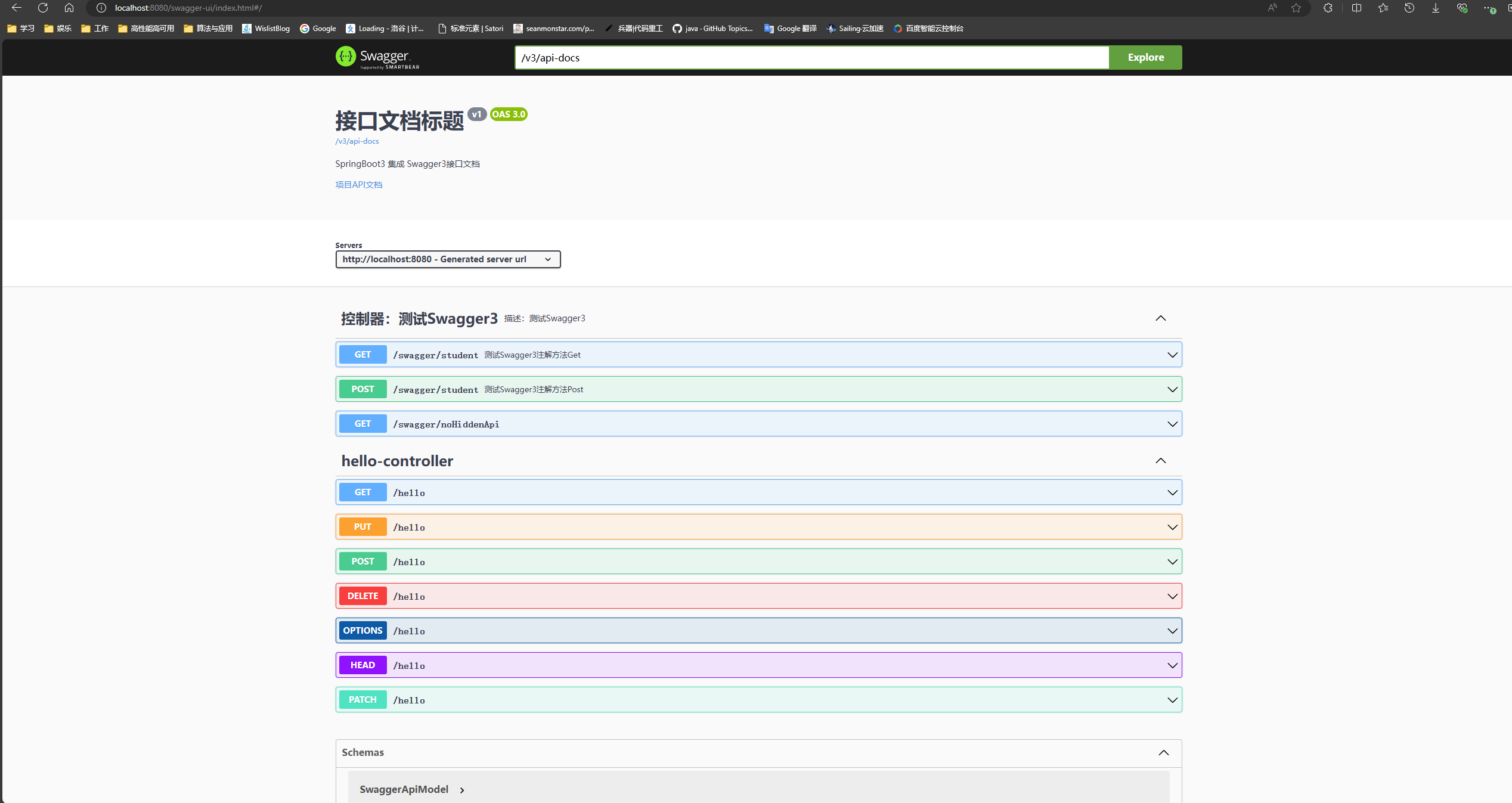
常用注解;
@Api:修饰整个类,描述Controller的作用
@ApiOperation:描述一个类的一个方法,或者说一个接口
@ApiParam:单个参数的描述信息
@ApiModel:用对象来接收参数
@ApiModelProperty:用对象接收参数时,描述对象的一个字段
@ApiResponse:HTTP响应其中1个描述
@ApiResponses:HTTP响应整体描述
@ApiIgnore:使用该注解忽略这个API
@ApiError :发生错误返回的信息
@ApiImplicitParam:一个请求参数
@ApiImplicitParams:多个请求参数的描述信息